Artificial intelligence is everywhere these days.
Whether you’re writing blog posts, creating social media content, editing photos, answering emails, or researching information, there’s probably an AI tool claiming it can do the job faster.
And honestly ? Many of them can.
But here’s the funny thing.
Most beginners don’t struggle because AI tools are complicated. They struggle because they make a few simple mistakes that lead to bad results, wasted time, and frustration.
If you’ve ever typed a prompt into an AI tool and thought, “Why did it give me this nonsense ?” you’re definitely not alone.
The good news is that most AI mistakes are easy to fix once you know what to look for.
In this guide, you’ll learn the most common AI tool mistakes beginners make and how to avoid them so you can get better results immediately.
Why So Many Beginners Struggle With AI Tools
AI tools seem simple on the surface.
You type something.
The AI responds.
Done, right ?
Not exactly.
Think of AI like hiring a very smart assistant who has read millions of books but doesn’t actually know what you’re specifically thinking.
If your instructions are vague, you’ll probably get vague results.
That’s why understanding common mistakes can dramatically improve your experience.
Read also :- How to Use AI Tools to Create Blog Posts Faster
1. Using Vague Prompts
This is probably the biggest mistake beginners make.
Many people type something like:
“Write a blog post about fitness.”
That’s not enough information.
The AI has no idea:
- Who the audience is
- What tone to use
- How long the article should be
- What specific fitness topic you want
Better Prompt Example
Instead of:
“Write a blog post about fitness.”
Try :
“Write a 1,500-word beginner-friendly article about home workouts for busy parents. Use a conversational tone and include practical examples.”
The more context you provide, the better the output becomes.
Quick Tip
Always include:
- Goal
- Audience
- Tone
- Format
- Length
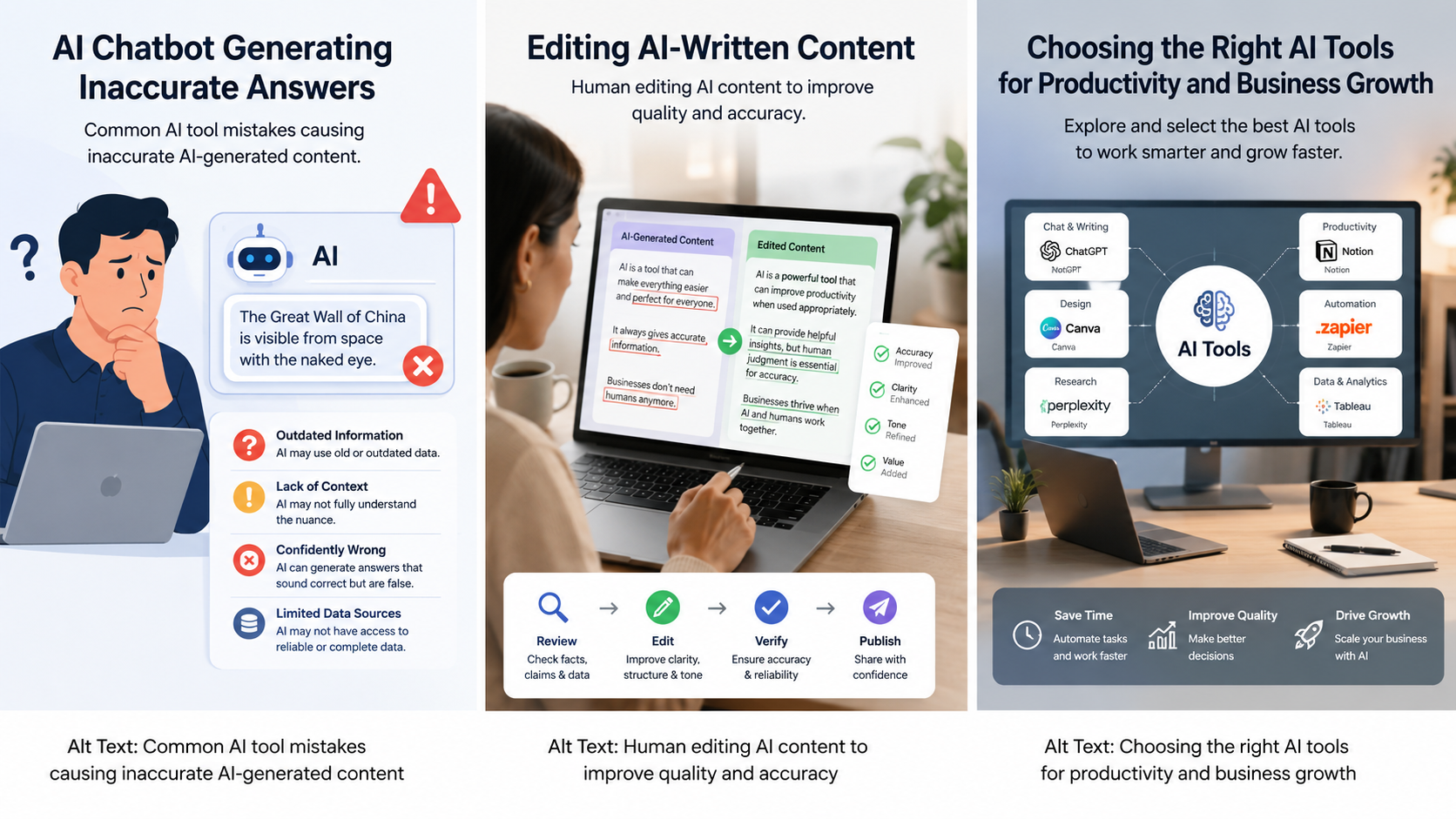
2. Trusting AI Output Without Fact- Checking
AI can sound extremely confident.
That’s both impressive and dangerous.
Sometimes AI provides information that sounds correct but isn’t.
This issue is often called “AI hallucination.”
For example:
- Incorrect statistics
- Outdated information
- Fake citations
- Wrong dates
- Made-up facts
What You Should Do
Always verify:
- Statistics
- Medical information
- Legal information
- Financial advice
- Historical facts
Reliable sources include:
A simple fact-check can save you from spreading misinformation.
Read also :- Biggest AI Tool Updates You Need to Know in 2026
3. Choosing the Wrong AI Tool
Not every AI tool is designed for every task.
Many beginners use one tool for everything.
That’s like using a hammer to fix every problem in your house.
Some tools excel at:
- Writing
- Coding
- Image generation
- Research
- Video editing
- Data analysis
Example
If you’re creating graphics, an image- generation tool may perform better than a text – focused AI assistant.
Always choose a tool that matches your specific goal.
4. Ignoring Prompt Refinement
Many beginners quit after one bad result.
They try a prompt once and decide the AI doesn’t work.
Experienced users do something different.
They refine.
Example Process
Prompt 1:
“Write a Facebook post.”
Result: Average.
Prompt 2:
“Write a Facebook post promoting a local bakery. Use a friendly tone and include a call-to-action.”
Result: Better.
Prompt 3:
“Write a Facebook post promoting a family – owned bakery in Texas. Highlight fresh ingredients, use a warm community – focused tone, and end with a special weekend offer.”
Result: Much better.
AI often works best through iteration.
Read also :- ChatGPT vs Gemini: Which AI Tool Is Better in 2026 ?
5. Publishing AI Content Without Editing
This is one of the fastest ways to create low – quality content.
AI-generated content often needs:
- Fact – checking
- Formatting
- Personal experiences
- Brand voice adjustments
- Grammar improvements
Think of AI as a first draft generator.
You are still the editor.
Real – World Example
Many successful bloggers use AI to speed up research and drafting.
Then they add:
- Personal stories
- Expert insights
- Unique opinions
- Real examples
That’s what makes content valuable.
6. Forgetting About Data Privacy
Some users paste sensitive information directly into AI tools.
That can be risky.
Avoid entering:
- Passwords
- Banking information
- Personal identification numbers
- Customer records
- Confidential business data
Before using any AI platform, review its privacy policy.
Protecting your information should always be a priority.
Read also :- Best AI Tools to Help You Get Hired Faster
7. Expecting AI to Replace Human Judgment
AI is powerful.
But it isn’t magic.
A common misconception is that AI can completely replace human decision-making.
In reality:
AI assists.
Humans decide.
For example:
An AI tool might suggest marketing ideas.
You still need to determine:
- Which idea fits your audience
- Which budget makes sense
- Which strategy aligns with your goals
Human experience remains extremely valuable.
8. Overusing AI for Everything
When people first discover AI, they often want to use it for every task.
That’s understandable.
It’s exciting.
But sometimes doing things yourself is actually faster.
Good uses for AI:
- Brainstorming
- Drafting content
- Summarizing information
- Research assistance
- Organization
Not – so – good uses:
- Important emotional conversations
- Major business decisions without review
- Highly specialized expert tasks without verification
Balance is important.
Read also :- 25 Best AI Tools to Try in 2026
9. Ignoring AI Limitations
Every AI system has limitations.
Beginners often assume AI knows everything.
It doesn’t.
Common limitations include:
- Outdated information
- Lack of real – world experience
- Occasional factual errors
- Misunderstanding context
- Bias in training data
Understanding these limitations helps you use AI more effectively.
The smartest users treat AI as a helpful assistant – not an all – knowing expert.
10. Not Learning Basic Prompt Engineering
The phrase “prompt engineering” sounds intimidating.
It’s actually simple.
Prompt engineering means learning how to communicate clearly with AI.
Example Formula
Role + Task + Context + Format
Example:
“You are a digital marketing expert. Create a 500 – word email campaign promoting a summer sale for a clothing store. Use a friendly tone and include three subject line ideas.”
This structure usually produces much better results.
Beginner Prompt Template
Copy this template:
Role:
Task:
Audience:
Goal:
Tone:
Length:
Format:
Special Instructions:
Using this framework can dramatically improve AI outputs.
Read also :- 15 AI Tool Hacks That Can Save You Hours Every Week
People Also Ask
What is the biggest mistake beginners make when using AI ?
The biggest mistake is using vague prompts. Clear instructions help AI generate more accurate and useful responses.
Can AI tools give incorrect information ?
Yes. AI can sometimes generate inaccurate or outdated information, so fact – checking is essential.
Do I need prompt engineering skills ?
Basic prompt – writing skills can significantly improve results and help you get more value from AI tools.
Should AI-generated content be edited ?
Absolutely. Editing improves accuracy, readability, originality, and overall quality.
Practical Checklist for New AI Users
Before using any AI tool, ask yourself :
Is my prompt specific ?
Am I using the right tool ?
Have I verified important facts ?
Did I review privacy concerns ?
Have I edited the output ?
Am I using AI as assistance rather than replacement ?
If you can answer “yes” to all six questions, you’re already ahead of many beginners.
Read also :- What Are AI Tools ? A Beginner’s Guide for 2026
The Future of AI Tools
AI technology continues to improve rapidly.
New tools appear almost every month.
Features that seemed impossible a few years ago are becoming normal.
However, one thing probably won’t change:
People who know how to use AI effectively will always get better results than those who simply press a button and hope for the best.
Learning good habits now will help you adapt as AI continues to evolve.
Real – Life Examples of AI Mistakes That Cost People Time and Money
The biggest problem with AI mistakes isn’t that they happen.
It’s that many people don’t realize they’re making them until the damage is already done.
Let’s look at a few real – world examples.
Example 1: The Blogger Who Published Without Editing
A beginner blogger used an AI writing tool to create a health-related article.
The content looked professional at first glance.
However, after publication, readers pointed out that several statistics were incorrect and some studies mentioned in the article didn’t actually exist.
The blogger had to remove the post and rewrite large sections of it.
The lesson ?
Always fact – check AI – generated information before publishing.
Example 2: The Small Business Owner Who Trusted AI Pricing Advice
A local business owner asked an AI tool for pricing recommendations.
The AI generated suggestions based on incomplete assumptions.
Without researching competitors or customer demand, the owner adjusted prices and saw sales drop significantly.
AI can provide ideas, but market research and human judgment still matter.
Example 3: The Student Who Relied Completely on AI
A student used AI to write an assignment.
The paper sounded impressive but contained several factual mistakes.
When questioned by the teacher, the student couldn’t explain parts of the content because they hadn’t reviewed it themselves.
The result was a lower grade than expected.
The takeaway is simple:
AI should support your work, not replace your understanding.
Read also :- How to Use AI Tools to Create Blog Posts Faster
How Successful AI Users Think Differently
One thing I’ve noticed is that experienced AI users don’t treat AI like a magic machine.
They treat it like an assistant.
Instead of asking:
“Do this for me.”
They ask:
“Help me do this better.”
That small mindset shift makes a huge difference.
Successful AI users typically:
- Give detailed instructions
- Verify important information
- Experiment with prompts
- Edit outputs carefully
- Combine AI with their own expertise
The best results come from teamwork between humans and AI.
Signs You’re Using AI Effectively
Not sure whether you’re using AI correctly ?
Here are some positive signs.
You’re Saving Time Without Losing Quality
Good AI usage should make work faster while maintaining quality.
If quality drops, something needs adjustment.
You Understand the Output
Never publish or submit content you don’t understand.
If AI generates something confusing, ask follow – up questions.
You’re Learning New Skills
AI shouldn’t make you dependent.
It should help you improve your own knowledge and abilities.
You’re Getting Consistent Results
When your prompts become more detailed and structured, you’ll notice your results become more predictable.
Consistency is one of the biggest signs of AI proficiency.
Read also :- How to Use AI Tools to Create Blog Posts Faster
How to Write Better AI Prompts: A Beginner’s Framework
Many people overcomplicate prompt engineering.
Here’s a simple framework that works surprisingly well.
Step 1: Define the Role
Tell AI who it should act as.
Examples:
- Digital marketing expert
- Fitness coach
- Financial advisor
- Travel planner
- Social media manager
Step 2: Explain the Task
Clearly describe what you need.
Example:
“Create a blog outline.”
“Write a product description.”
“Generate email subject lines.”
Step 3: Add Context
This is where many beginners fail.
Include details such as:
- Audience
- Industry
- Goals
- Experience level
Step 4: Specify the Format
Tell AI exactly how you want the answer presented.
Examples:
- Bullet points
- Numbered list
- Blog post
- Table
- Step – by – step guide
Step 5: Add Constraints
Examples:
- 500 words
- Friendly tone
- Beginner audience
- American English
The more specific your instructions, the more useful your results become.
Read also :- How to Use AI Tools to Create Blog Posts Faster
AI Myths Beginners Still Believe
As AI becomes more popular, myths continue to spread online.
Let’s clear up a few of them.
Myth #1: AI Is Always Right
False.
AI can make mistakes, misunderstand questions, and generate inaccurate information.
Myth #2: AI Will Replace Everyone’s Job
Not exactly.
AI is more likely to automate specific tasks rather than replace entire professions.
People who learn to work alongside AI often gain an advantage.
Myth #3: Better AI Means No Human Editing
Completely false.
Even advanced AI systems benefit from human review.
Myth #4: Prompt Engineering Is Only for Experts
Not true.
Anyone can learn basic prompting skills within a few days.
Read also :- How to Use AI Tools to Create Blog Posts Faster
Best Practices for Using AI in 2026 and Beyond
AI technology continues evolving rapidly.
To stay ahead, follow these best practices.
Stay Updated
New AI features are released regularly.
Spend a little time each month learning what’s new.
Experiment Often
Some of the best discoveries happen through testing.
Try different prompts and compare results.
Keep Learning
AI rewards curiosity.
The more you learn about your industry, the better you’ll be able to guide AI.
Focus on Problem Solving
Don’t use AI simply because it’s trendy.
Use it because it helps solve a real problem.
AI Tools Beginners Commonly Use
Here are some categories of AI tools many people start with.
Writing AI Tools
Useful for:
- Blog posts
- Emails
- Social media content
- Product descriptions
Image Generation Tools
Useful for:
- Marketing graphics
- Blog images
- Social media visuals
- Creative projects
Research Assistants
Useful for:
- Summarizing information
- Organizing notes
- Finding ideas
Coding Assistants
Useful for:
- Debugging
- Learning programming
- Writing code snippets
Remember, every category has strengths and limitations.
Choosing the right tool matters just as much as learning how to use it.
Read also :- How to Use AI Tools to Create Blog Posts Faster
Final Words
If you’re worried about making AI tool mistakes beginners make, don’t stress too much.
Almost everyone makes these mistakes when they first start using AI.
The difference between beginners and advanced users isn’t access to better technology.
It’s knowing how to use the technology effectively.
Focus on creating better prompts, fact – checking information, editing outputs, and understanding AI’s limitations.
Do that consistently, and you’ll quickly move from frustrated beginner to confident AI user.
The best approach is simple:
Use AI as a powerful assistant – not a replacement for your own thinking.
When you combine human creativity with AI efficiency, that’s where the real magic happens.
Leave a Reply